
Remodel AI - Home Design
RemodelAIArt & Design
4.452.00 Reviews
- Version
- 0.9.16
- Installs
- 100.00K
- Age Rating
- Everyone
Screenshots
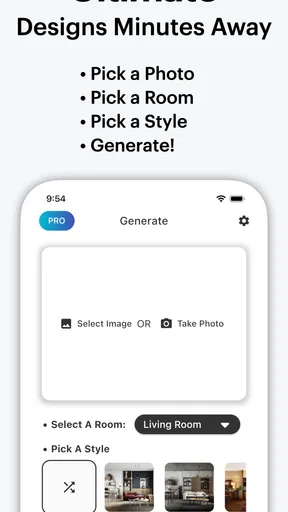
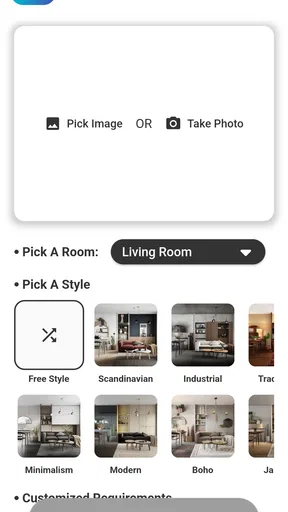
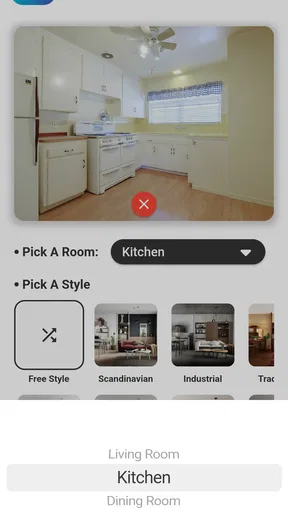
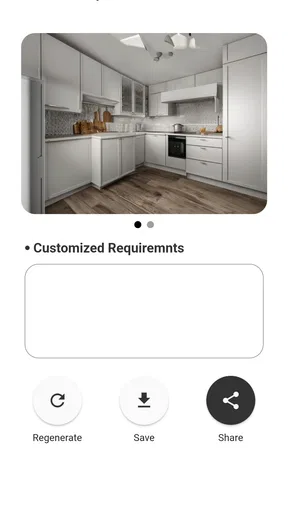
Our Review of Remodel AI - Home Design
 Analysis by Appyee
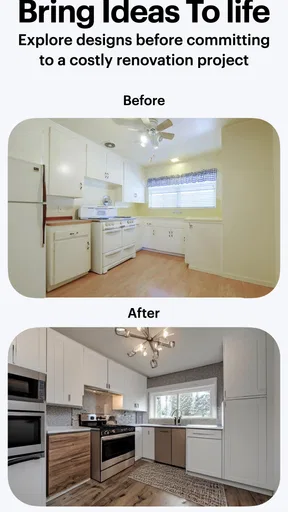
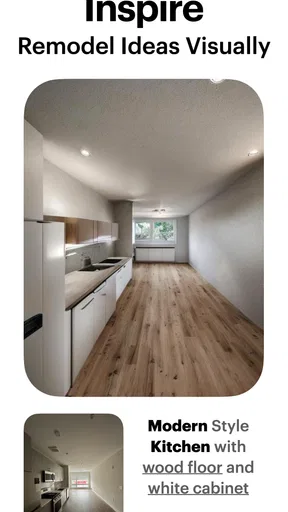
I tried Remodel AI as a visual planning tool rather than treating it like a complete interior-design service, and that distinction matters. The app turns photos of rooms, outdoor areas, kitchens, and bathrooms into redesigned concepts, making it easier to explore a direction before buying paint, furniture, lighting, or materials. I found it most useful when I already had a real space in mind and wanted quick visual alternatives instead of spending hours searching through inspiration images.
It belongs to the Art & Design category and comes from RemodelAI. The app is free to install, with optional purchases ranging from $1.99 to $79.99 per item. That makes it easy to test without committing immediately, but it also means I would approach the paid options carefully and decide whether the generated images are genuinely helping my project before spending anything.
How I Would Decide Whether It Fits My Project
The first question is not whether the images look attractive. Most redesign tools can produce attractive images. The better question is whether the app helps me make a decision I was struggling with. If I am choosing between a warmer kitchen style and a cleaner modern one, planning a bedroom refresh, preparing a property for a listing, or imagining a garden change, visual mockups can be much more useful than a written description.
I would also consider how fixed the project is. Remodel AI works best at the concept stage, when I am open to several directions. It is less suitable when I need exact measurements, construction drawings, a materials schedule, or a guarantee that a particular cabinet, sofa, tile, or plant will fit. The generated result is a visual suggestion, not a technical plan.
My other decision criterion is tolerance for imperfect details. Artificial redesigns can communicate mood, color balance, and general layout surprisingly well, while still getting small architectural elements wrong. A doorway may feel slightly altered, a window may not remain perfectly consistent, or a piece of furniture may appear in a way that would be impractical in the real room. I would use the output to narrow choices, then verify every important detail separately.
The app is aimed at ordinary homeowners, renters, decorators, real-estate users, and curious people who want to see possibilities quickly. Its Everyone content rating makes it approachable for general use. It also runs on Android starting with version 8.0, so it is not restricted to only recent phones, although the experience will naturally depend on the device and the quality of the photo.
What the first photo should accomplish
A good starting image is more important than I expected. I get more useful results from a well-lit photo taken from a natural standing position than from a dark image captured at an extreme angle. Before uploading, I would clear temporary clutter, open curtains where possible, and make sure the room boundaries are visible. The goal is not to make the room look perfect; it is to give the visual system enough context to understand the space.
I would avoid using a very tight crop that hides the floor, ceiling, windows, or major furniture. Those elements provide scale and structure. If I want to test a change to one wall, I would still include enough of the surrounding room to judge whether the proposed style belongs there. This simple preparation step produces more meaningful comparisons than repeatedly generating ideas from a poor photo.
Why the visual approach feels different from ordinary inspiration searches
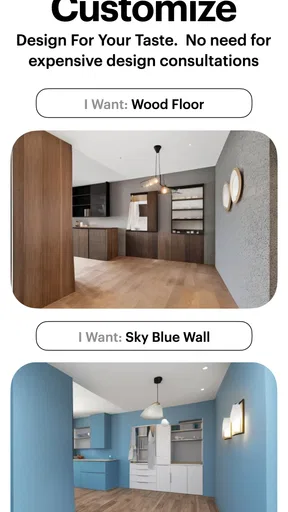
Browsing design websites or social feeds is useful for collecting ideas, but those images usually show someone else’s room. Remodel AI starts with my room, which changes the question from “Do I like this style?” to “Could this direction work here?” That makes the app especially helpful for people who understand their taste only after seeing an example in context.
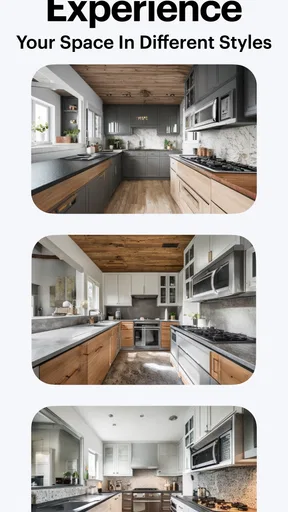
I can also use the same space as a reference while considering different moods. A bright, restrained redesign may make a small room feel calmer, while a richer style may add character but also make the space feel visually busier. Seeing those possibilities over the original photo helps me notice trade-offs that are easy to miss in a catalog.
Where Remodel AI Is Strongest
The clearest strength is speed. Instead of building a room from scratch in a complicated design program, I can begin with a photograph and explore a concept visually. That lowers the barrier for people who are not comfortable with professional design software. I do not need to understand three-dimensional modeling to ask a basic question about the direction of a room.
Its range also makes it more flexible than a tool focused only on furniture placement. The app covers room redesign, kitchen and bathroom ideas, virtual staging, and landscape design. Those uses are related, but they involve different decisions. A living room needs attention to atmosphere and furniture balance, while a bathroom concept is more about surfaces, fixtures, storage, and lighting. A landscape image can help me think about the relationship between planting, paths, and the building exterior.
I found the app particularly valuable for early conversations. If two people have different interpretations of “modern,” “cozy,” or “minimal,” a generated image gives them something concrete to discuss. It becomes easier to say, “I like the color direction, but not the heavy furniture,” or “The layout feels right, but I want more natural texture.” That is more productive than arguing over vague labels.
Useful workflows beyond a single makeover image
One practical workflow is to create a small decision set rather than chasing endless variations. I would begin with the original room, then compare a few clearly different directions: for example, a lighter neutral approach, a warmer natural approach, and a more dramatic color-led approach. The value comes from comparing them side by side, not from generating an unlimited stream of attractive rooms.
Another useful approach is to separate style decisions from purchasing decisions. First, I would use the app to decide whether the room should feel airy, intimate, traditional, or contemporary. Only after that would I search for real products. This prevents a common mistake: buying individual items because they look appealing online, then discovering that they do not create a coherent room together.
For virtual staging, I would treat the image as a way to help a viewer imagine the potential of an empty or dated space. It can make a listing presentation feel more approachable than a bare room photo. However, I would keep the original condition clear in any real property communication. A staged concept should inspire, not mislead someone about what is physically present.
For outdoor planning, the app can help me compare broad visual directions before contacting a landscaper or visiting a garden center. I might use one concept to explore a softer, planted look and another to consider cleaner lines around a patio or walkway. The important limitation is that an attractive image does not account for local climate, drainage, mature plant size, soil, maintenance, or structural requirements. I would use it to discuss an idea, not to choose plants blindly.
Kitchen and bathroom concepts need extra caution
Kitchens and bathrooms are where visual inspiration can be most persuasive and most misleading. A redesigned image may help me judge whether darker cabinetry, lighter surfaces, or a different overall mood appeals to me. It can also reveal that my preferred style depends on more natural light than the actual room receives.
Still, I would not rely on the image for plumbing positions, electrical work, ventilation, clearances, appliance dimensions, waterproofing, or cabinet construction. These rooms combine appearance with technical constraints. A concept that looks balanced on screen may be expensive or impossible to reproduce without major changes. I see the app as a conversation starter for a contractor or designer, not a substitute for either.
Small details that improve the quality of a comparison
I would keep the camera position consistent when testing different ideas. If every new photo is taken from a different corner, it becomes difficult to tell whether the redesign improved the room or whether the perspective simply changed. Consistent framing makes the comparison fairer and helps me notice the effect of color, furniture density, and visual weight.
I would also judge the image at two levels. First, I would look from a distance and ask whether the overall atmosphere feels right. Then I would inspect details and ask whether the result still respects the actual room. This two-step check prevents me from accepting a beautiful concept that quietly changes the features that matter most, such as the location of a window or the usable walking path.
Another non-obvious benefit is that the app can help identify what I do not want. A redesign that feels too cold, crowded, dark, or ornate is still useful if it clarifies the boundaries of my taste. I would save those lessons rather than treating every unsuccessful result as wasted time.
What the reception suggests, and what it does not guarantee
The app has a 4.4 average from around 4.3 thousand ratings, with over 100 thousand installs. That is enough to show that many people find the concept appealing, but it should not replace my own test with a real room photo. AI design quality can vary with lighting, camera angle, room complexity, and the kind of change I am asking for.
The current version is 0.9.16, which reinforces my view that I should treat the experience as an evolving creative tool rather than a mature professional suite. That is not automatically a problem. Early-stage software can still be useful, especially when the main goal is quick ideation. It does mean I would keep my expectations focused on visual exploration.
Where Other Options May Fit Better
Remodel AI is not automatically the best choice for every design question. If I need exact floor plans, precise dimensions, or a construction-ready layout, a dedicated room-planning or computer-aided design tool is a better fit. Those tools usually require more effort to learn, but they are designed around measurement and control rather than imaginative visual transformation.
If my main goal is shopping, a furniture retailer’s room visualizer may be more practical. It may keep the process closer to products that can actually be ordered, while Remodel AI is better at exploring an overall look without tying the idea to a specific catalog. The trade-off is freedom versus purchasing certainty.
For professional interior work, a human designer remains stronger when the project involves structural limitations, detailed budgets, custom joinery, lighting plans, or several decision-makers. A professional can ask questions that an image generator cannot, spot conflicts between preferences, and adapt a plan to regulations and practical constraints. I would bring generated concepts to that conversation if they help explain my taste, but I would not expect them to replace professional judgment.
For simple inspiration, a mood-board app or an image-search service may be enough. Those alternatives are often better when I want to collect references, materials, or examples from real completed projects. Remodel AI wins when I want to see a possible direction applied to my own room. It loses when authenticity, exact products, or technical accuracy matters more than speed.
Who should skip it
I would skip this app if I am looking for a precise renovation quote, a reliable shopping list, or a guaranteed representation of how a finished project will look. I would also be cautious if I dislike experimenting with images or if my project depends on exact architectural proportions. In those situations, the app may create more false confidence than useful clarity.
It may also be a weak fit for someone who already works comfortably in a detailed design program and needs full control over every wall, opening, measurement, and object. The simplicity that makes Remodel AI approachable can feel restrictive to an experienced user who wants to edit a plan rather than request a visual interpretation.
Understanding the cost of switching from an idea to a real project
The free entry point makes trying the app straightforward, but the real cost is not only the purchase price. The bigger cost can be acting on an attractive image without checking whether the design works in the real space. Before spending on materials, I would verify dimensions, lighting at different times of day, storage needs, cleaning demands, and the practical movement through the room.
I would also decide in advance what success means. If the app helps me choose a wall color or explain a style to my partner, a small amount of experimentation may be worthwhile. If I expect it to produce a complete renovation plan, I am likely to be disappointed. Optional purchases between $1.99 and $79.99 per item make that expectation-setting especially important. I would start with the free experience and pay only when a specific project justifies it.
There is also a switching cost between this kind of visual concept and a professional workflow. A generated image may need to be translated into measurements, product references, drawings, and a budget. The more ambitious the renovation, the more translation is required. That is not a flaw unique to this app; it is the normal gap between inspiration and implementation. The app is valuable when it reduces uncertainty at the beginning, not when it pretends to remove every later step.
A realistic everyday example
Imagine I am preparing to refresh a tired living room before guests arrive. I do not yet know whether to repaint, replace the rug, or change the furniture arrangement. I would photograph the room in daylight, keep the framing consistent, and use a few distinct redesign directions rather than asking for endless random styles. If one version makes the space feel too crowded, that teaches me to protect the walking route. If another looks calm but lifeless, I might keep the color palette while adding texture through real furnishings.
After choosing a direction, I would measure the room and compare those measurements with actual furniture dimensions. I would use the generated image as a visual brief while shopping, not as proof that every item shown will fit. In this scenario, the app saves me from making a vague decision, but it does not eliminate the need for tape-measure work or sensible buying.
My Recommendation for Different Types of Users
For a homeowner or renter who wants fast, personal design ideas, I recommend giving Remodel AI a try. The combination of photo-based redesign, kitchen and bathroom concepts, virtual staging, and landscape exploration gives it a broader role than a simple inspiration gallery. I especially recommend it when I am stuck between several styles and need to see how they might relate to my actual space.
For a property seller, it can be useful as a presentation aid, provided the concept is clearly treated as a visualization. For a decorator, it can help open a client conversation. For a professional designer, it may be a quick brainstorming companion, although anyone needing precision will still need more controlled tools.
I would not recommend paying immediately. I would first test a representative photo, compare a few purposeful directions, and inspect whether the app preserves the room features that matter. If the results help me make a decision, the optional purchases may be worth considering for that project. If the images are merely attractive but impractical, I would stop there.
My bottom line is simple: this is a strong early-stage visualization app, not a replacement for measurements, product research, or professional renovation planning. Its best quality is that it turns an abstract design question into something I can react to. Its main weakness is the same thing that makes it exciting: a polished image can look more certain than the underlying idea really is.
RemodelAI has created a free, accessible way to explore home design on compatible Android devices, and its 2023 release has developed into a useful option for visual experimentation. I would keep it for the moment when I need to answer, “What direction feels right for this space?” Once that answer is clear, I would move to measurements, real products, and expert advice where the project demands them.
Verdict
Strengths of Remodel AI - Home Design
- Generates multiple room redesign concepts from a single photo.
- Offers a wide range of interior styles for different tastes.
- Useful for visualizing renovations before spending on materials.
- Simple interface makes experimenting quick and accessible.
- Can provide inspiration for furniture, colors, and room layouts.
Limitations of Remodel AI - Home Design
- Results may occasionally distort windows, furniture, or room proportions.
- Some advanced designs and features may require a paid plan.
- AI suggestions may not reflect realistic construction limitations.
- High-resolution image generation can take time on slower devices.
- Privacy concerns may arise when uploading photos of your home.
Similar Picks in This Category
View All
Canva: AI Photo & Video Editor
Canva4.8

PENUP – Drawing-sharing SNS
Samsung Electronics Co., Ltd.4.5

Crafto
Kutumb App4.6

Sketchbook
Sketchbook4.1

ibis Paint X
ibis inc.4.5

Adobe Express: AI Photo, Video
Adobe4.6
Frequently Asked Questions
What is Remodel AI - Home Design, and what can I use it for?
Remodel AI - Home Design is an AI-powered interior and exterior design app that helps you visualize changes to rooms, houses, and other spaces. You can upload a photo, choose a design style or renovation category, and generate alternative looks for areas such as living rooms, kitchens, bedrooms, bathrooms, gardens, and facades. It is mainly intended for inspiration and concept planning before starting a real renovation.
How accurate are the designs generated by Remodel AI - Home Design?
The app can produce attractive and useful visual ideas, but its results should not be treated as exact architectural plans. Furniture proportions, room dimensions, lighting, windows, doors, materials, and structural details may be changed or interpreted incorrectly by the AI. For that reason, generated images are best used as inspiration. Always confirm measurements, construction requirements, costs, and technical decisions with a qualified designer, architect, or contractor.
Does Remodel AI - Home Design require an internet connection?
Most AI image-generation features generally require an active internet connection because photos are uploaded to remote servers for processing. Without reliable Wi-Fi or mobile data, you may be unable to create new designs or may experience long waiting times and failed generations. The exact availability of browsing, saved projects, or previously downloaded images can depend on the app version and device, so checking the current requirements before downloading is recommended.
Is Remodel AI - Home Design free to download and use?
The app may be available to download at no initial cost, but some features, generation credits, premium styles, higher-quality results, or unlimited use can require in-app purchases or a subscription. Pricing and trial conditions may vary between Android and iOS and can change over time. Before confirming payment, review the store listing and subscription screen carefully, including renewal terms and cancellation instructions.
Is my home photo safe when I upload it to Remodel AI - Home Design?
Before uploading interior or exterior photos, review the app’s privacy policy and the permissions requested on your device. AI design services commonly process images through online systems, so you should avoid including sensitive documents, personal information, valuables, children, or identifiable people in photographs. Use the minimum permissions necessary, and check how long uploaded images are stored, whether they are used for service improvement, and how deletion requests are handled.
